
Its most useful feature is that it opens the working address for you; when the address changes, keeping the app updated is usually enough. This page covers setup steps, mobile safety tips and fixes for common problems.
What Is The Elitcasino Mobile App?
Our mobile app is the browser lobby adapted for your phone. The table below summarises the basics (information dated 17.11.2026):
| Parameter | Value |
|---|---|
| Platforms | iOS and Android |
| Account | Same as in the browser; no separate registration |
| Address | The app opens the working address itself |
| Balance and bonuses | Shared with desktop |
| Announcements | Telegram @elitcasinoresmi and @elitcasinovip |
| Support | Telegram bot @elitcasinodestekbot |
With the app you handle deposits, withdrawals, promotions and live betting slips from your phone. You do not need a new account for Elitcasino mobile login; the username and password you already use on desktop work here. Registration and sign-in steps are explained on our Login page.
What Is Inside The App?
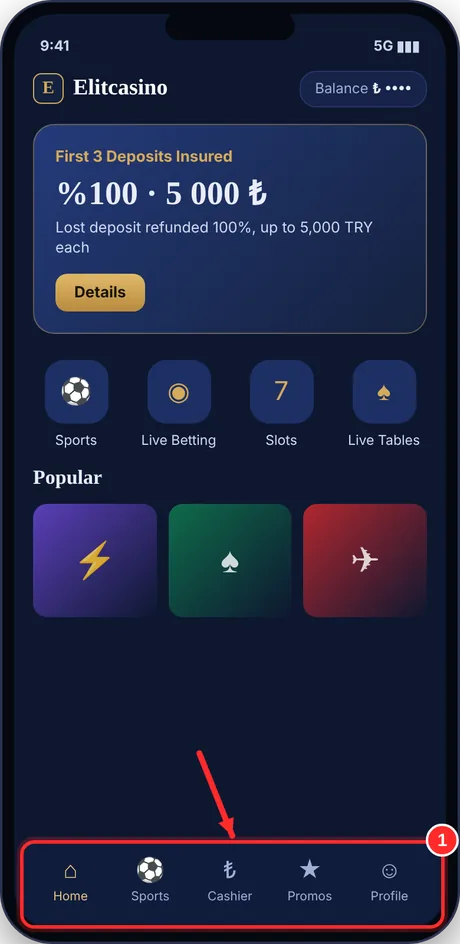
The home screen offers sports, live betting, slots, live tables and promotions. The cashier and profile menu sit at the top of the screen. Your Elit+ Loyalty progress, XP and balance are shown on your profile page. The menu is simplified for the small screen, so every section is a few taps away. Live streams and live tables can also open in full screen.
Setup Steps For iOS And Android
Install only through the link our official channel points to. Three steps:
- Open the @elitcasinoresmi channel on Telegram and read the pinned announcement.
- On Android, download the .apk file from our official site and install it; on iOS, open the site in Safari, tap Share and choose Add to Home Screen.
- Open the app, sign in with your username and password, then switch on SMS Güvenlik in your profile.
Elitcasino Android users download the .apk file from our official site; the app is not on Google Play, so your phone may ask you to allow installs from unknown sources. Elitcasino iOS users get the app as a PWA: open the site in Safari, tap Share and choose Add to Home Screen; there is no separate app in the App Store. Do not trust installation links that come from outside our channels; fake apps may try to collect user data.
First Settings After Installation
When you first open the app, sign in and enable SMS Güvenlik in your profile. Allow notifications so you see address announcements and midnight codes first. Check your screen lock, and use autofill only with a password manager you trust. Turning on automatic updates largely prevents old-address problems.
Before installing, make sure your phone has enough free storage and a current operating system. Allowing notifications after setup also helps you avoid missing bonus codes published at midnight.
How The App Opens The Working Address
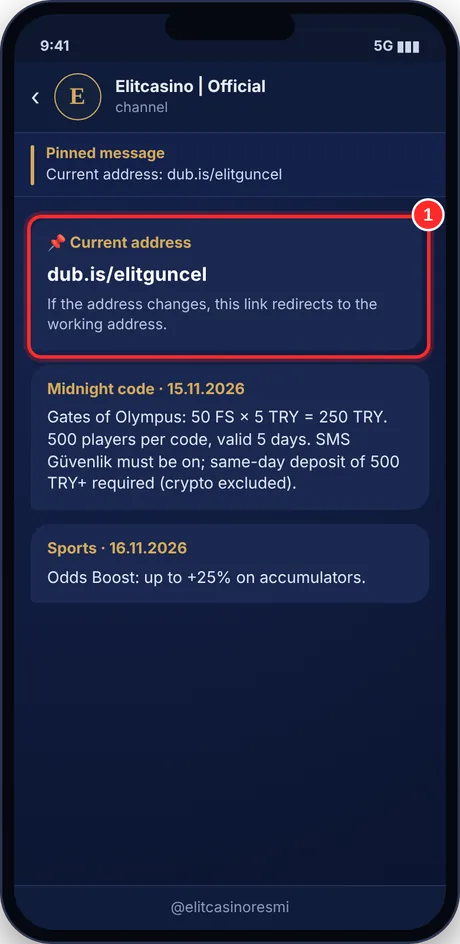
Each time it starts, the app looks for the working address. That means you do not have to search for the new address by hand when it changes. If the app is an old version, an update may be needed.
| Situation | What to do |
|---|---|
| App opens normally | Fine; the working address was opened automatically |
| App opens an old address | Update the app |
| Still not opening after the update | Restart the phone and check your connection |
| Problem continues | Send our bot your device model and the error |
If you prefer the browser, the link dub.is/elitguncel redirects to the working address. For details on address problems see our Current Address page. Even when you use the app, following address announcements on the channel is a good habit.
When you move to a new phone, sign in with the same username and password; your balance and bonus status stay on your account. Remember to sign out on the old phone and delete saved passwords.
App Versus Browser
Because the app opens the working address by itself, you never need to know the address number. In the browser you open the address from the channel or the permanent link. In both cases your account, balance and bonus status are identical. Whichever way you choose does not change the gameplay; only the way you reach the site differs.
Mobile Account Safety
To protect your account on a phone, keep these points in mind:
- On Android, download the .apk only from our official site; on iOS, use Add to Home Screen.
- Set a screen lock; on Elitcasino Android devices also review app permissions.
- Enable SMS Güvenlik in your profile; daily bonus codes depend on it being on.
- Never share your password or SMS code; our support team never asks for them.
- Do not leave your session open on someone else's phone.
If you lose your phone, change your password from another device first, then message our bot. If you notice a sign-in from an unknown device while using the Elitcasino mobile app, change your password at once. For safety and verification details, see our Is It Safe page.
Public Networks
Whether you use Elitcasino iOS or Android, do deposits and withdrawals over mobile data rather than public Wi‑Fi when you can. Remember that the network owner may see your traffic. When signing in, check that the address bar shows the right address, and sign out when you finish.
Bonuses And Promotions On Mobile
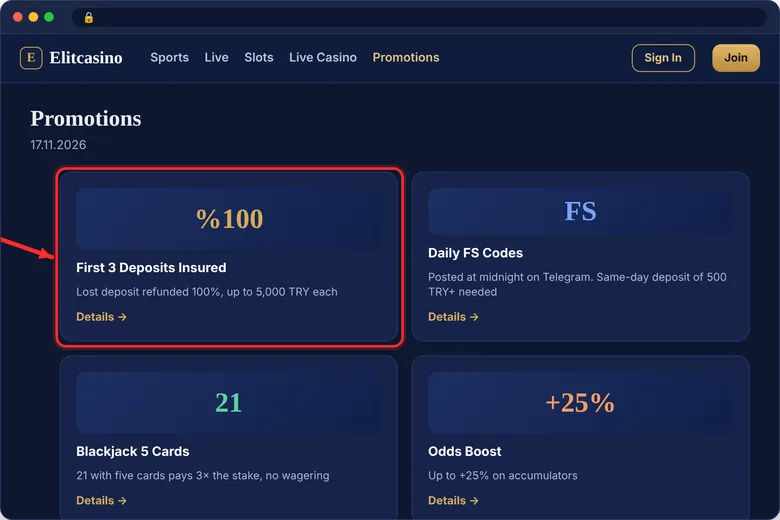
Promotions are the same on mobile. Current details (17.11.2026):
| Promotion | Condition |
|---|---|
| Loss refund on first 3 deposits | 100% each, up to 5,000 TRY |
| Daily FS codes | Posted at midnight on Telegram; SMS Güvenlik must be on |
| Blackjack five-card rule | 21 with five cards pays 3× the stake, cash with no wagering |
| Odds Boost | Up to +25% on accumulators |
After Elitcasino mobile login, open the promotions section to see announcements. If you plan to use a code, check the same-day deposit rule and the crypto exception in the announcement text. For full rules see our Bonus page. Keeping mobile notifications on helps you see midnight codes first.
Before You Use A Code
When a code is posted at midnight, open the announcement and read the date, entry condition and validity. Example (15.11.2026): 50 FS × 5 TRY = 250 TRY on Gates of Olympus, 500 players per code, same-day deposit of 500 TRY or more (crypto excluded), valid for 5 days. Use the code once you meet the condition; because places are limited, seeing the announcement early matters.
App Problems And Fixes
| Problem | Likely cause | Fix |
|---|---|---|
| App will not open | Old version or connection | Update and check your connection |
| Old address opens | App not up to date | Update the app |
| No code arrives | Phone number or carrier | Check the number, wait, message our bot |
| Bonus code fails | SMS Güvenlik off or crypto deposit | Switch on SMS Güvenlik, read the condition |
| Stream stutters | Weak connection | Switch to Wi‑Fi, lower stream quality |
If the problem continues, add your device model, operating system version and a screenshot of the error to your message. If you missed an Elitcasino app update, install it first; most problems end there. For trouble with Elitcasino Android or iOS builds, say which system you use.
On mobile data, live streams and live tables use more data. Prefer Wi‑Fi when you can.
Most app problems come from an old version, a weak connection or phone settings. Try the update first, then the connection, and restart the device last. Reopening the app after each step helps narrow down the cause.
Having enough free space and an up-to-date operating system also helps installation finish smoothly. If the issue persists, write to the support bot with a screenshot.
Getting Ready For Support
Before writing to our bot, collect your username, device model, operating system version, app version and a screenshot of the error. Send the message in one piece and wait for the reply in the same conversation. Our support team never asks for a password or SMS code; if you receive such a request, do not answer.
FAQ
Is there an Elitcasino app?
Yes, we have an app for iOS and Android; it opens the working address by itself.
Do I need a separate account for the Elitcasino mobile app?
No. The account and balance you use in the browser also work in the app.
Is Elitcasino iOS installed from the same channel as Android?
No. On Android the .apk comes from our official site, and on iOS the site is added from Safari through Add to Home Screen; the address is in our Telegram announcement.
I cannot complete Elitcasino mobile login, what should I do?
Update the app, check your connection, and if that fails write to @elitcasinodestekbot.
How do I update the app?
On Android, download and install the new .apk from our official site; on iOS the home-screen icon runs through the site, so it stays current by itself. The current version finds the working address.
What does the app do when the address changes?
It opens the working address itself; just keep the app updated.
My gambling is becoming a problem, what should I do?
The platform is for ages 18 and over. You can get free help on the YEDAM 115 line.